













However you create it. It all lands in one place in Pixa.

SyncActive
Nebim ERPPull products
Instant
ShopifyPull products
15 min
TrendyolPull new products
15 min
1,284 products in sync

From your ERP or your store.

If your records live in Nebim or on your store, Pixa pulls them in and keeps them in sync.

New productDraft
Variant
BlackCream

One by one in the panel.

You create a new product in the panel; variants and bundles are set up on the same screen.

ProductSKU
Kilburn IIIMRSH-KLB3
Emberton IIMRSH-EMB2
Acton IIIMRSH-ACT3
Stanmore IIIMRSH-STN3
WillenMRSH-WLN
ExportImport from Excel

In bulk from Excel.

Create hundreds of products in one go with the Excel template, and update them from the same file.

Create once, publish to every catalogue. Catalogue management from one place.

The product record is created.

It lands in the Master Product List in Pixa and stays as one record, from title to barcode.

New Product Record
SingleBulk from ExcelPull from ERP
Create record
Lands in the Master Product List

A rule is attached.

You define once which record goes to which catalogue, and it runs on its own after that.

Catalogue RuleCategory · Audio
New records in this category are pushed to these catalogues
TrendyolElectronics › Speakers
HepsiburadaAudio › Speakers
ShopifySpeakers · your own store
AmazonOff for this category
Save the rule
The rest runs on its own

It is pushed to the catalogues.

You push the record to the Trendyol, Hepsiburada or Shopify catalogue instead of entering the product again.
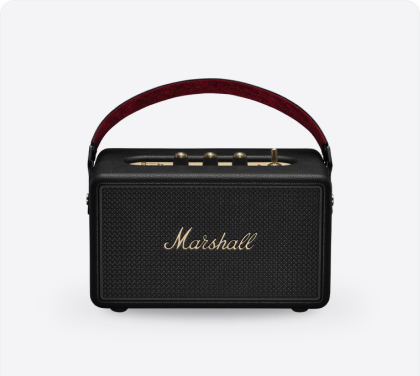
Marshall Kilburn III Portable Bluetooth SpeakerBlack · MRSH-KLB3-BLK
CategoryAudio › Speakers
BrandMarshall
Barcode7340055380591
Sale price₺14,999.00
8 images · 14 attributes · fields complete
Tr
TrendyolElectronics › Speakers
Live
He
HepsiburadaAudio › Speakers
Live
Am
AmazonElectronics › Speakers
Live
N1
N11Electronics › Speakers
Live
Bo
BoynerElectronics › Speakers
Live
Hi
HipiconDesign › Audio & Tech
Live
Sh
ShopifySpeakers · your own store
Live
ik
ikasAudio · your own store
Live
New Product Record
SingleBulk from ExcelPull from ERP
Create record
Lands in the Master Product List
Catalogue RuleCategory · Audio
New records in this category are pushed to these catalogues
TrendyolElectronics › Speakers
HepsiburadaAudio › Speakers
ShopifySpeakers · your own store
AmazonOff for this category
Save the rule
The rest runs on its own
Marshall Kilburn III Portable Bluetooth SpeakerBlack · MRSH-KLB3-BLK
CategoryAudio › Speakers
BrandMarshall
Barcode7340055380591
Sale price₺14,999.00
8 images · 14 attributes · fields complete
Tr
TrendyolElectronics › Speakers
Live
He
HepsiburadaAudio › Speakers
Live
Am
AmazonElectronics › Speakers
Live
N1
N11Electronics › Speakers
Live
Bo
BoynerElectronics › Speakers
Live
Hi
HipiconDesign › Audio & Tech
Live
Sh
ShopifySpeakers · your own store
Live
ik
ikasAudio · your own store
Live

Matching is the heart of the catalogue. You always know where a product stands on each channel.

It matches on barcode.

A product already listed on a marketplace is matched to the record by stock code and barcode.

Or by a channel-specific barcode.

If the barcode differs, you enter the platform’s own barcode and the product links to the record.

Status at a glance.

You see the Linked, Not Linked and Closed tabs, and can close a product with one click.

Images work the same way. Pulled from the source, uploaded one by one or in bulk.

Product ImagesSource · Trendyol
12 images pulledThe channel’s images were written onto the record.
Pull ImagesRe-match

Pulled from the source.

Images in your ERP or on the marketplace are pulled into Pixa and written to the record.

Product ImagesBlack ▾
Upload image +
CoverReorder

Uploaded one by one.

You upload images to the record from a file, order them and split them by variant.

Bulk Image UploadBy barcode
Drop your files here
8690123_1.jpg→ MRSH-KLB3
8690124_1.jpg→ MRSH-EMB2
8690125_1.jpg→ MRSH-ACT3

Uploaded in bulk.

You upload hundreds of images at once, matched to barcodes by file name or a list of links.

Manage your product records from one place.

Try it free for 14 days; we don’t ask for payment details.

Start free

You set the flow up once. The record arrives, updates and goes to the catalogue.

Fetch Product

A product created in your ERP or on your store arrives in Pixa immediately and lands in the Master Product List, so your team works from one list.

How it works
Trigger
Nebim ERP
New product record created
Pixa · Pull Product
Record pulled into Pixa
Trigger
Nebim ERP
New product record created
Pixa · Pull Product
Record pulled into Pixa
Trigger
Nebim ERP
Record data changed
Pixa · Update Product
Record updated
Trigger
Nebim ERP
Record data changed
Pixa · Update Product
Record updated
Trigger
Nebim ERP
New product record created
Pixa · Push Rule
Channel picked by category
Pixa · Push to Catalogue
Pushed to the catalogue
Trigger
Nebim ERP
New product record created
Pixa · Push Rule
Channel picked by category
Pixa · Push to Catalogue
Pushed to the catalogue
Trigger
Trendyol
Product found on the channel
Pixa · Match Product
Linked to the record by barcode
Trigger
Trendyol
Product found on the channel
Pixa · Match Product
Linked to the record by barcode
Trigger
Pixa
A record arrived with an empty description
AI · Write Description
Product description written
Trigger
Pixa
A record arrived with an empty description
AI · Write Description
Product description written

The record reaches the catalogue and links to the product on the channel. Matching runs on the barcode.

It matches on barcode automatically.

If the barcode or stock code on the channel matches the record exactly, Pixa links the two on its own.
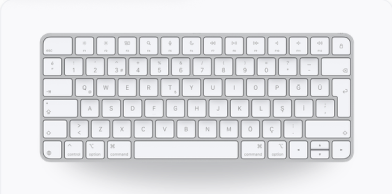
PiPixa
Magic Keyboard (USB-C)Turkish Q layout · parent productSKU MXCL3TQ
Stock48 unitsLinked
Price₺5,499.00Linked
ContentTitle, descriptionLinked
Images4 imagesLinked
Matched
TrTrendyol
Magic Keyboard USB-C QThe record already live on the channelSKU MXCL3TQ
Stock48 unitsLinked
Price₺5,499.00Linked
ContentTitle, descriptionLinked
Images4 imagesLinked

Or links on a channel barcode.

For a product listed under a different barcode, you add that barcode to the record; Pixa matches on it and the record moves to the Linked tab.

Product · Channel CodesMRSH-KLB3-BLK
A product listed under a different barcode on the channel is linked through this code.

Once linked, stock and price flow.

Stock and price for a matched product go to the channel from Pixa, and you follow its status in the Linked, Not Linked and Closed tabs.

Trigger
Trendyol1. Product found on the channel
Pixa · Match Product2. Linked to the record by barcode
Pixa · Push Stock3. Stock pushed to the channel
Pixa · Push Prices4. Price pushed to the channel
PiPixa
Magic Keyboard (USB-C)Turkish Q layout · parent productSKU MXCL3TQ
Stock48 unitsLinked
Price₺5,499.00Linked
ContentTitle, descriptionLinked
Images4 imagesLinked
Matched
TrTrendyol
Magic Keyboard USB-C QThe record already live on the channelSKU MXCL3TQ
Stock48 unitsLinked
Price₺5,499.00Linked
ContentTitle, descriptionLinked
Images4 imagesLinked
Product · Channel CodesMRSH-KLB3-BLK
A product listed under a different barcode on the channel is linked through this code.
Trigger
Trendyol1. Product found on the channel
Pixa · Match Product2. Linked to the record by barcode
Pixa · Push Stock3. Stock pushed to the channel
Pixa · Push Prices4. Price pushed to the channel
Product record

There is one product record in Pixa. Created once, sent to every channel from there.

Start free

Frequently asked
questions

It is the single record holding a product’s title, description, images, variants, category and barcode; marketplace and store catalogues are fed from it.

Three ways: sync from your ERP or store, create them one by one in the panel, or upload them in bulk with the Excel template.

They are matched to the record in Pixa by stock code and barcode; if the barcode differs, they link on the platform’s own barcode.

You push the record to the channel catalogues you choose, or set a rule so every incoming record is distributed automatically.

Yes: simple, variant, bundle and linked product types are all managed in the same record structure.

Sync them from the source, upload them one by one to the record, or upload in bulk matched to barcodes by file name or a list of links.

Fetching, updating, pushing to catalogues and matching are set up as rules, and AI completes the description and category steps inside the flow.

It is a core module in Starter, Lite, Pro and Advanced, at no extra cost.

Integration, automation, warehouse and
AI solutions.

Destek
Genellikle bir saat içinde yanıt verir

Destek
Merhaba 👋

Size nasıl yardımcı olabiliriz?
×